Showing posts with label voicethread. Show all posts

Wednesday, June 18, 2014

Book Reviews Using VioceThread

For my Literacy Project, I created a lesson that incorporated the use of technology. I decided to you VoiceThread with my students since it is almost the end of the school year and it is one of the new pieces of technology that I am most comfortable using with my students.

With my class, I had students select their favorite book they read during the school year. Then they wrote a book review based on a set of features we developed as a group. Before writing, their book review, they looked for an image of the book or drew a cover of their own for the book. After they wrote their book reviews, they had peers help edit and revise, and then practiced reading their book review aloud for fluency. I then set them up to audio record their book review in VoiceThread, which had its trails due to the microphone not picking up sound. The result was not thoroughly edited but I am proud with my result and first attempt at using VoiceThread with my students.


My ultimate goal is to have this particular VoiceThread grow beyond just the books I have here. I would like to continue to add books or remove book reviews.  I would like my incoming sixth graders to write their responses to these sixth graders and share what they liked about the books, if they choose to read that book based on the review.

Eventually, I would like to create leveled book review VoiceThreads. Since I have a diverse group of readers at many different reading levels, I would like to create VoiceThreads for struggling reluctant readers and VoiceThreads for my advanced readers. I can see this happening during the next school year.

Monday, June 16, 2014

Mind Olympics

Tomorrow my students will be participating in what our team calls “Mind Olympics.”  The “Mind Olympics” is a friendly competition against the homerooms on our sixth grade team where they play mind games.  Each homeroom teacher creates a challenging mind activity for the students and they earn points for first through fifth place.  We tally the points up at the end of the day then announce the winner.  The mind challenges are:

24 Game – This is a math card game in which the object is to find a way to manipulate four numbers so that the result is 24.  Addition, subtraction, multiplication, or division, and sometimes other procedures, may be used to make four numbers from one to nine equal 24.

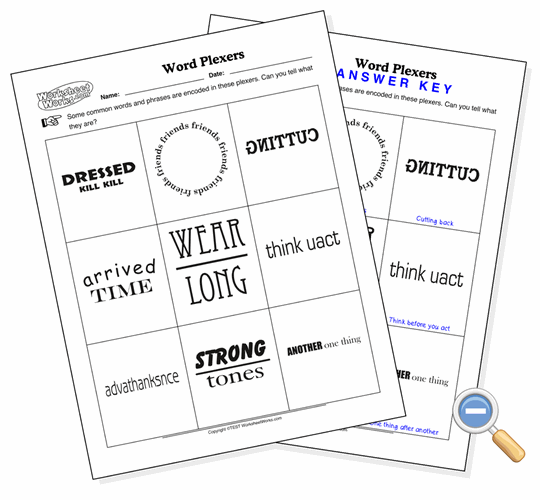
Word Plexers – These are word-based puzzles that describe a word or phrase without actually spelling it out.  For example, KCART would be backtrack since it is the word track spelled backwards.
http://www.worksheetworks.com/images/prev/Word_Plexer_lg.gif
Paper Tower Challenge – The goal is for students to create the tallest free standing tower with only one piece of paper and 20 centimeters of tape. 
http://prod.zurb.s3.amazonaws.com/friday15/uploads/activity/artwork/25/papertower.jpg 


Sudoku – Is a puzzle in which players insert the numbers one to nine into a grid be made up of of nine squares subdivided into a further nine smaller squares in such a way that every number appears once in each horizontal line, vertical line, and square.

Sudoku example
I am running the Sudoku challenge.  I give them the easiest puzzle I can find and never have a homeroom complete it within the 50 minutes.  Sudoku is challenging but not many students even know what Sudoku is before I explain it.  In the years past, I have created a PowerPoint that explains the rules.  However, that does not seem to be enough to help them understand it. I usually have one or two students that have played it before and they help explain it to others.  I had not thought of this before but this year I will show a YouTube video explaining the directions.  If I had more time, I would have created my own VoiceThread explaining each step.


Students have a blast with these challenging mind games.  Hopefully my homeroom takes first place this year!


Wednesday, June 11, 2014

Ruff! Rough Draft of My Digital Story

For my digital story, I had two choices; I could create a digital story for my Accelerated Reader program or for Open House for the beginning of school.  I decided to create my first digital story to share at Open House.  For starters, I strongly dislike public speaking.  I can talk to my students all day long: however, if I have to address my peers in a public forum, I become extremely anxious.  Either way this rough draft of my digital story had my head spinning.
I began using VoiceThread but I wanted to add seamlessly music and not just my voice.  So then, I tried using Photo Story 3 and Windows Movie Maker at the same time.  I uploaded all the pictures and screenshots and began moving them around.  Photo Story 3 is linear and when moving pictures around was cumbersome.  However, Movie Maker was nonlinear and I felt like I had more space to maneuver. 
The hardest part of this journey was taking pictures that I thought would be useful in my digital story.  However, the trickiest part of creating my digital story was trying to do the narration.  I had issues with the sound on my laptop.  Then I would try to record my voice and the microphone stopped working.  I decided to try music.  Since I am extremely indecisive, selecting music that I thought would match took more time than necessary.  Below is my "ruff" draft. I intend to add my voice little by little maybe one slide at a time.